Updates · v0.20 · November 6, 2026
Which version of your app are people running?

Joe Masilotti
Founder, Ruby Native
You ship an update, it clears review, and it goes live. But how many people are running it? Until now, your app page could tell you how many devices opened your app, not which version they were on.
Ruby Native 0.20 fixes that, and adds a few things people have been asking for: tab badges with letters and dots (not just numbers) and a share sheet you can open from your own HTML buttons.
#A version breakdown on your app page
Each store card on your app page now shows which versions of your app people run, from each device's most recent launch. After you ship an update, you can watch the bar fill in as people pick it up.
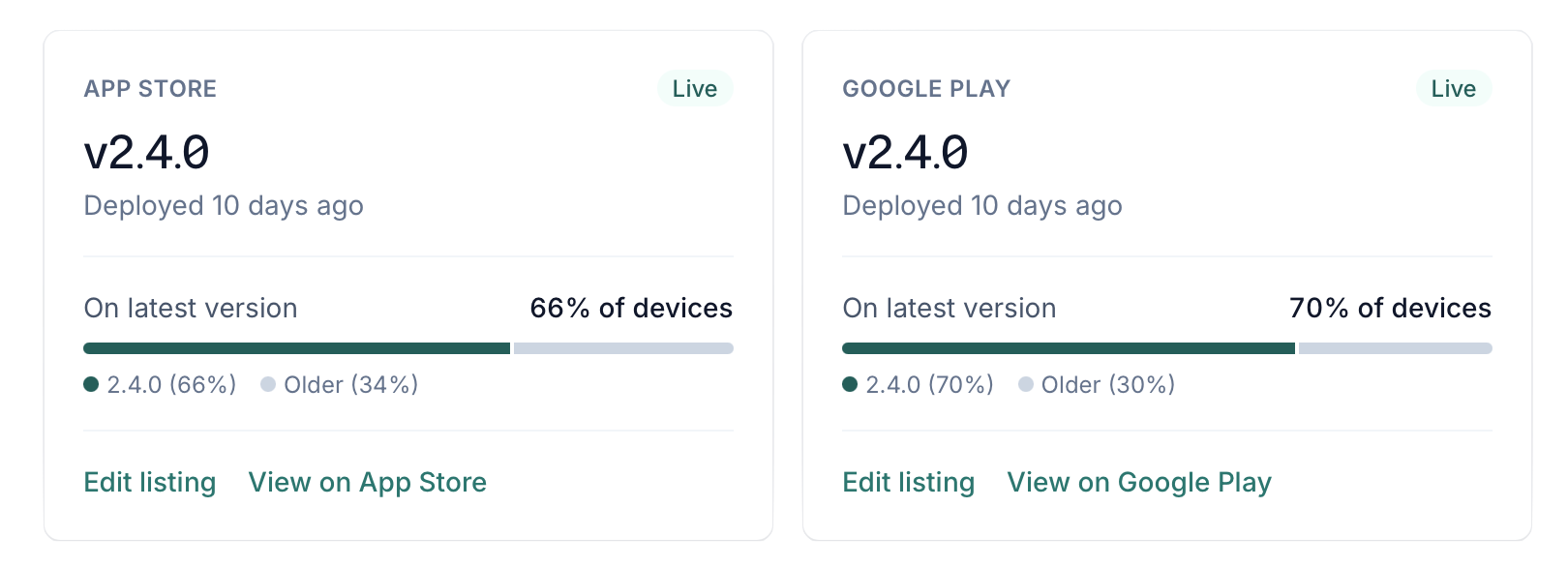
Nothing to set up. The launch ping your app already sends now includes its version number, and that's the only change. No user ID, and nothing from your Rails session. If you've turned reporting off with analytics: false, it stays off. See usage reporting for exactly what's sent.
Builds from before 0.20 don't send a version, so those devices show up as "Older" until people update.
#Dots and labels on any tab
Tab badges used to be counts, and only on the one tab marked badge: true. Now a badge can be a dot or a short label, and tabs: badges any tab by its key in config/ruby_native.yml:
<%= native_badge_tag(tab: true) %>
<%= native_badge_tag(tabs: { inbox: @unread_count, whats_new: !current_user.seen_whats_new? }) %>
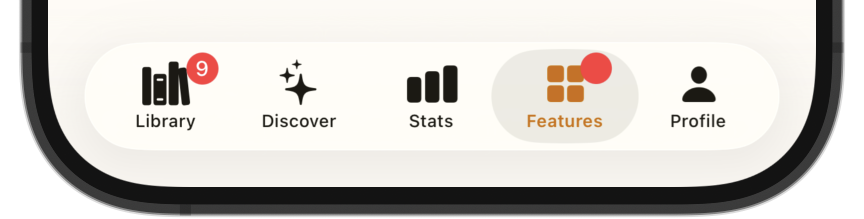
Heads up if your app is already live: builds from before 0.20 ignore tabs:, and a dot or a label clears the badge instead of showing it. To keep a count showing for people who haven't updated yet, keep badge: true in your config and keep passing the count as tab:, with tabs: alongside it:
<%# inbox has badge: true. Newer builds show a dot, older builds show the count. %>
<%= native_badge_tag(tab: @unread_count, tabs: { inbox: true }) %>
When both name the same tab, newer builds use tabs: and older builds use tab:. The badges docs have the details.
#Share from your own buttons
RubyNative.share() opens the native share sheet from any button on your page. Pass a URL, or leave it out to share the current page:
<button onclick="RubyNative.share()">Share</button>
It works in both modes and on Android, where web views don't support navigator.share. See Share from JavaScript.
#Long-press feels like an app
Long-pressing text in your app no longer selects it, and long-pressing a link no longer pops up a preview. That's how native apps behave, and it was one of the last tells that you're looking at a web page.
Form fields still work as you'd expect. For anything people should be able to copy, like a confirmation code or an address, add the native-selectable class:
<p class="native-selectable"><%= @order.confirmation_code %></p>
The rest of this post rounds up everything since the last update. Some of it shipped in 0.19.1 or went live on rubynative.com, so you may already have it.
#Your coding agent sets up more of it
Your coding agent can now create your app on rubynative.com with ruby_native link --new, or as part of the ship prompt, instead of you filling in the form. It also gets the preview ready before handing it to you: it installs cloudflared and checks that your Rails server is running, so all that's left is running ruby_native preview and scanning the code.
#New Easier screenshot uploads
Uploading your own screenshots got friendlier. You can add them a few at a time, reorder them by dragging the cards, and upload JPEGs. Transparent App Store screenshots are flattened on upload instead of refused.
#Fixes
pull_to_refresh: falsenow turns off pull-to-refresh in Advanced Mode on iOS. Pages without a native navbar don't get it either.- Publishing a listing with no sign-in clears Apple's Sign-in required box, so App Review no longer asks for an account you don't have.
#Upgrading
There are no breaking changes. A minor version needs one change to your Gemfile, since bundle add pinned you to 0.19:
gem "ruby_native", "~> 0.20.0"
Then update the gem, deploy your site, and build:
bundle update ruby_native
bundle exec ruby_native deploy
The version breakdown, the new badges, share, and the long-press change all need a new build, so they reach people as they update your app.
See your Rails app on your phone
Try the demo app on your phone, then point it at your own Rails app. It takes a few minutes.
Try Ruby Native on your phoneQuestions, or want help getting to the app stores? Email me at [email protected].