In-app purchases
This is currently only available on iOS.
Add subscriptions to your Ruby Native app. Your users purchase directly in the app via Apple's StoreKit and your Rails app handles the rest. No third-party services required.
In-app purchases are available on the Business plan.
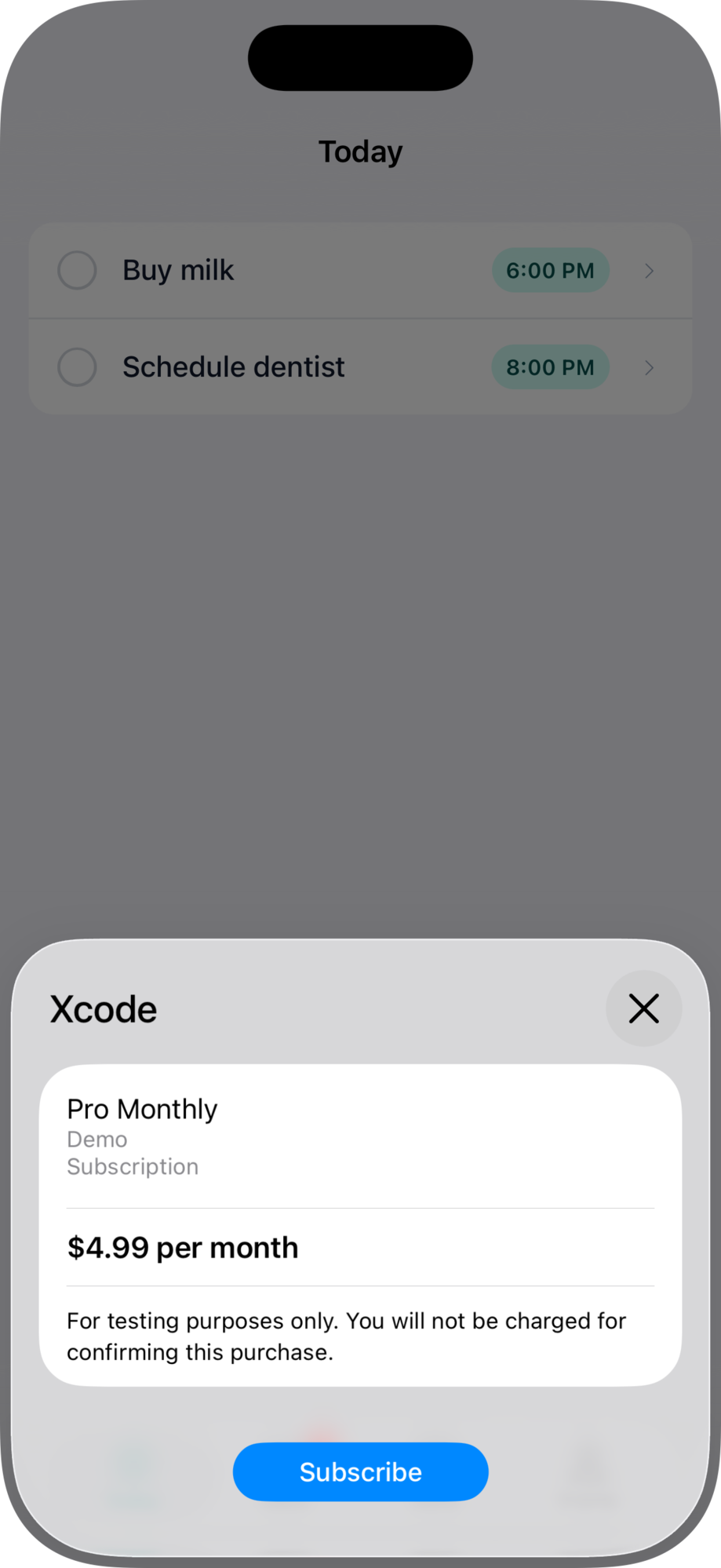
#How it works
- Your Rails app renders a paywall page with product IDs and a subscribe button.
- The native app displays the paywall and resolves live, localized pricing from Apple.
- The user taps subscribe, completes the purchase via Apple, and is redirected to a success page.
- Apple sends webhook notifications for renewals, cancellations, and refunds to your server.
- Your Rails app processes each event via the
on_subscription_changecallback.
#1. Install the gem's IAP support
Run the IAP generator to create the purchase intents migration:
bin/rails generate ruby_native:iap
bin/rails db:migrate
#2. Configure the callback
Add your subscription callback in config/initializers/ruby_native.rb. This fires for every subscription event (new purchase, renewal, cancellation, refund).
# config/initializers/ruby_native.rb
RubyNative.on_subscription_change do |event|
  user = User.find_by(id: event.owner_token)
  next unless user

  subscription = user.subscription || user.build_subscription
  subscription.update!(
    product_id: event.product_id,
    original_transaction_id: event.original_transaction_id,
    status: event.status,
    expires_at: event.expires_date
  )
end
#Event methods
| Method | Description |
|---|---|
event.type |
"subscription.created", "subscription.updated", "subscription.canceled", or "subscription.expired" |
event.status |
"active" or "expired" |
event.owner_token |
Your user/customer identifier (passed when creating the purchase) |
event.product_id |
Apple product ID (e.g., com.yourapp.pro.monthly) |
event.original_transaction_id |
Apple's identifier for the subscription |
event.transaction_id |
Apple's identifier for this specific transaction |
event.purchase_date |
When this transaction was purchased |
event.expires_date |
When the current period ends |
event.environment |
The Apple environment the event came from (production or sandbox) |
event.active? / event.expired? |
Status checks |
event.created? / event.canceled? |
Type checks |
Renewals, plan changes, and auto-renew toggles all arrive as subscription.updated; a refund arrives as subscription.expired. If you follow the example above and mirror event.status and event.expires_date into your own model, every type is already handled and you rarely need to branch on event.type at all. Note that canceled still reports an "active" status: the user turned off auto-renew but keeps access until the period ends.
#3. Set the webhook URL in App Store Connect
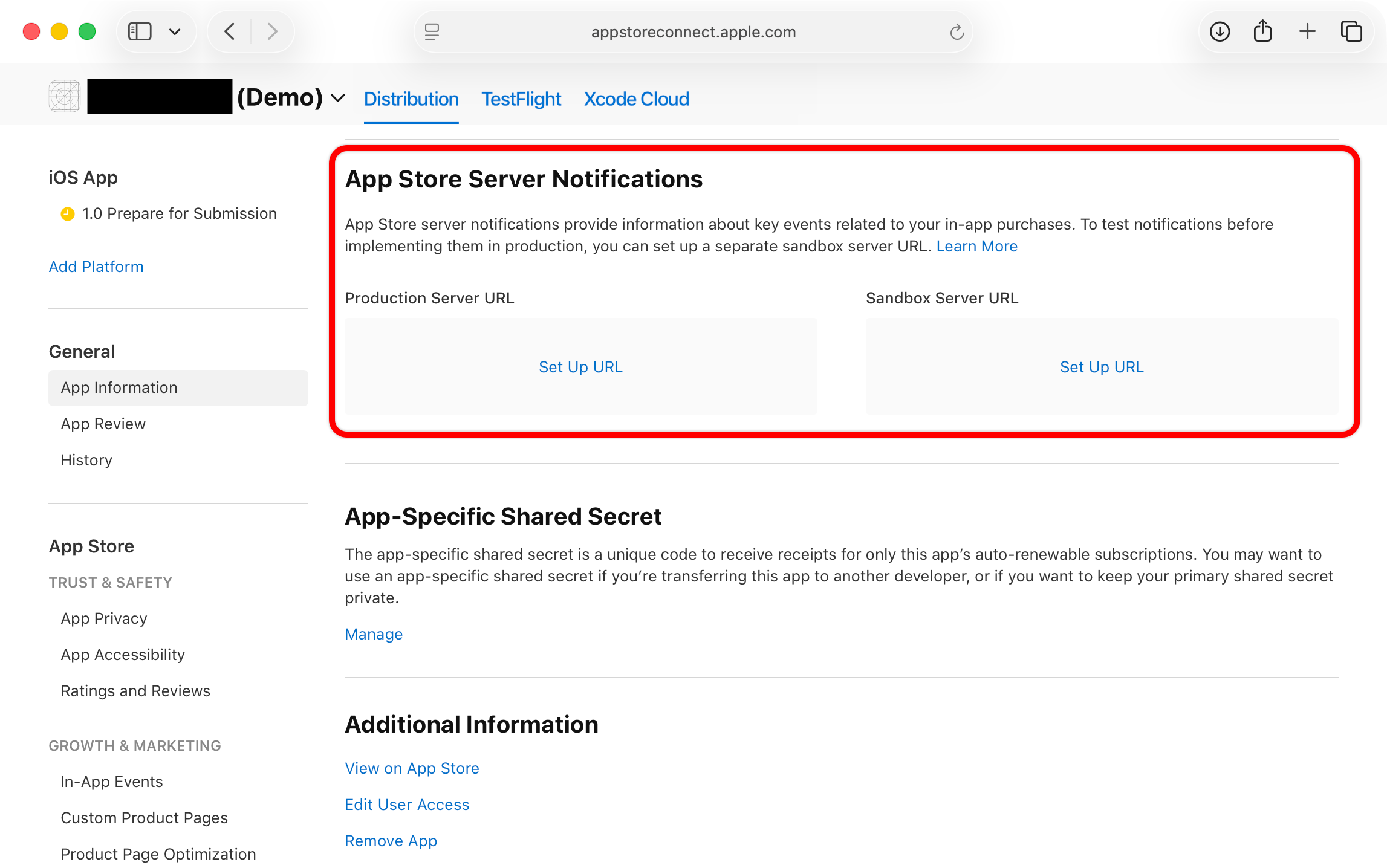
Apple delivers renewals, cancellations, and refunds as App Store Server Notifications sent directly to your Rails app. The gem mounts the receiving endpoint at /native/webhooks/apple and handles verification and parsing; each event reaches your app through the callback above.
Point Apple at your app once:
- Open your app in App Store Connect and go to App Information.
- Under App Store Server Notifications, click Set Up URL for the Production Server URL.
- Enter
https://yourapp.com/native/webhooks/applewith your production domain, and choose Version 2 notifications. - Set the same URL as the Sandbox Server URL so sandbox purchases send events too.
#4. Build your paywall
Create a paywall page with signal elements. The native app detects these and wires up StoreKit automatically. Use the product IDs from App Store Connect. You can find them in your app's Purchases tab in the Ruby Native dashboard after syncing.
<%# app/views/paywalls/show.html.erb %>

<h1>Upgrade to Pro</h1>

<div data-native-purchase="com.yourapp.pro.monthly"
     data-native-customer-id="<%= current_user.id %>"
     data-native-success-path="<%= dashboard_path %>">

  <p>
    Monthly: <span data-native-price="com.yourapp.pro.monthly">$9.99</span>/month
  </p>

  <button type="submit">Subscribe</button>
</div>

<button data-native-restore>Restore purchases</button>
#Signal elements
| Attribute | Description |
|---|---|
data-native-purchase="PRODUCT_ID" |
Container for a purchasable product. Tapping the submit button inside triggers StoreKit. |
data-native-customer-id="ID" |
Your user identifier. Passed back in the owner_token event field. |
data-native-success-path="/path" |
Where to navigate after a successful purchase. |
data-native-price="PRODUCT_ID" |
Replaced with the localized price from Apple (e.g., "$9.99"). |
data-native-restore |
Tapping this element restores previous purchases. |
The data-native-price element shows a fallback price in HTML until Apple loads the real price. This means your paywall works on the web too.
#5. Deploy
Deploy your Rails app and trigger a new build in Ruby Native. The build automatically enables StoreKit when synced products exist.
#Testing
Apple provides a sandbox environment for testing purchases without real charges. Create a sandbox tester account in App Store Connect and sign in on your test device under Settings, then App Store, then Sandbox Account.
Sandbox subscriptions renew on an accelerated schedule:
| Duration | Sandbox renewal |
|---|---|
| 1 week | 3 minutes |
| 1 month | 5 minutes |
| 3 months | 15 minutes |
| 6 months | 30 minutes |
| 1 year | 1 hour |